~/set a deadline for windows update installation (wsus, group policy and intune)
How to force an urgent update to install by a set time with a WSUS deadline, and the modern equivalents in Group Policy and Intune. Plus the restart gotchas.
Updated November 2026. The WSUS steps below are unchanged, but Microsoft has deprecated WSUS. It still works and is supported, but gets no new features. If you’re on Intune or Windows Update for Business, skip to the modern options.
Setting a deadline in WSUS
Sometimes you need a critical update installed sooner than your normal maintenance window. In WSUS you can do this by setting an installation deadline when you approve the update.
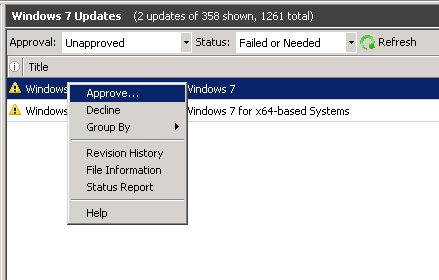
In the WSUS console, select the update or updates, right-click and choose Approve…
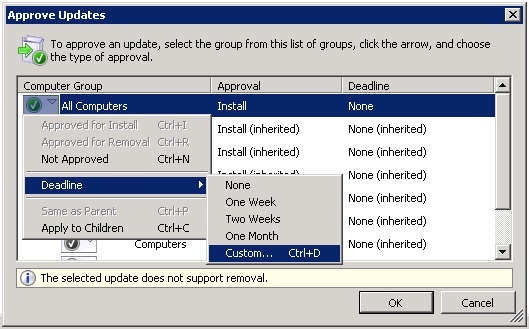
In the Approve Updates window, choose the computer group (I’ve used All Computers) and set it to Approved for Install. Then right-click the group again and choose Deadline → Custom.
Pick the date and time the update must be installed by:
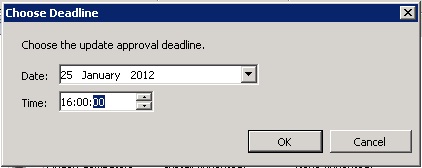
That’s it. The update will install by the time you set.
The gotchas
I’d still use deadlines with care:
- Machines restart regardless. If the update needs a restart, the computer restarts after installing it, whatever the user is doing. Avoid deadlines in the middle of the working day.
- A deadline overrides “No auto-restart with logged on users.” If you rely on that Group Policy setting to prevent restarts, a deadline will ignore it.
The modern options
Group Policy (Windows 10 and 11)
Use Computer Configuration → Administrative Templates → Windows Components → Windows Update → Manage end user experience → Specify deadlines for automatic updates and restarts. You set a number of days for quality and feature updates, plus a grace period before a forced restart. That’s much friendlier than a fixed date and time.
Intune (Windows Update for Business)
In a Windows update ring policy, set:
- Deadline for quality updates: days before installation is forced
- Grace period: days after installation before a restart is forced
- Auto reboot before deadline: whether to restart outside active hours before the deadline
For truly urgent fixes, Intune’s expedite quality updates feature pushes a specific security update to devices as fast as possible, overriding the normal ring delays.
Same advice as in 2012: tell users before you force anything, and set the grace period long enough that people can save their work.