~/cisco asa with dual isps: one for internet, one for vpn
Splitting traffic across two ISP connections on a Cisco ASA 5505 using static routes: general Internet out of one line, site-to-site VPN traffic out of the other. Archived.
Archived post. This was written for an ASA 5505 on software version 8.4, which is long out of support. The idea, steering VPN traffic and general Internet traffic out of different ISP connections with static routes, still applies to ASA and other firewalls, but check the syntax and interface model for your platform. On current Cisco Secure Firewall (FTD) devices you’d normally do this in the management centre rather than the CLI.
The problem
The 2 Mb Internet connection at one of our offices was getting congested. We added an ADSL line to split the load, but the ASA 5505 couldn’t load-balance between two ISPs. Instead, I kept the existing 2 Mb circuit for VPN traffic only and used the new ADSL line for Internet browsing.
The solution turned out to be simple: static routes. The default route goes out of one connection; the remote VPN peer, and traffic for the remote office subnet, go out of the other.
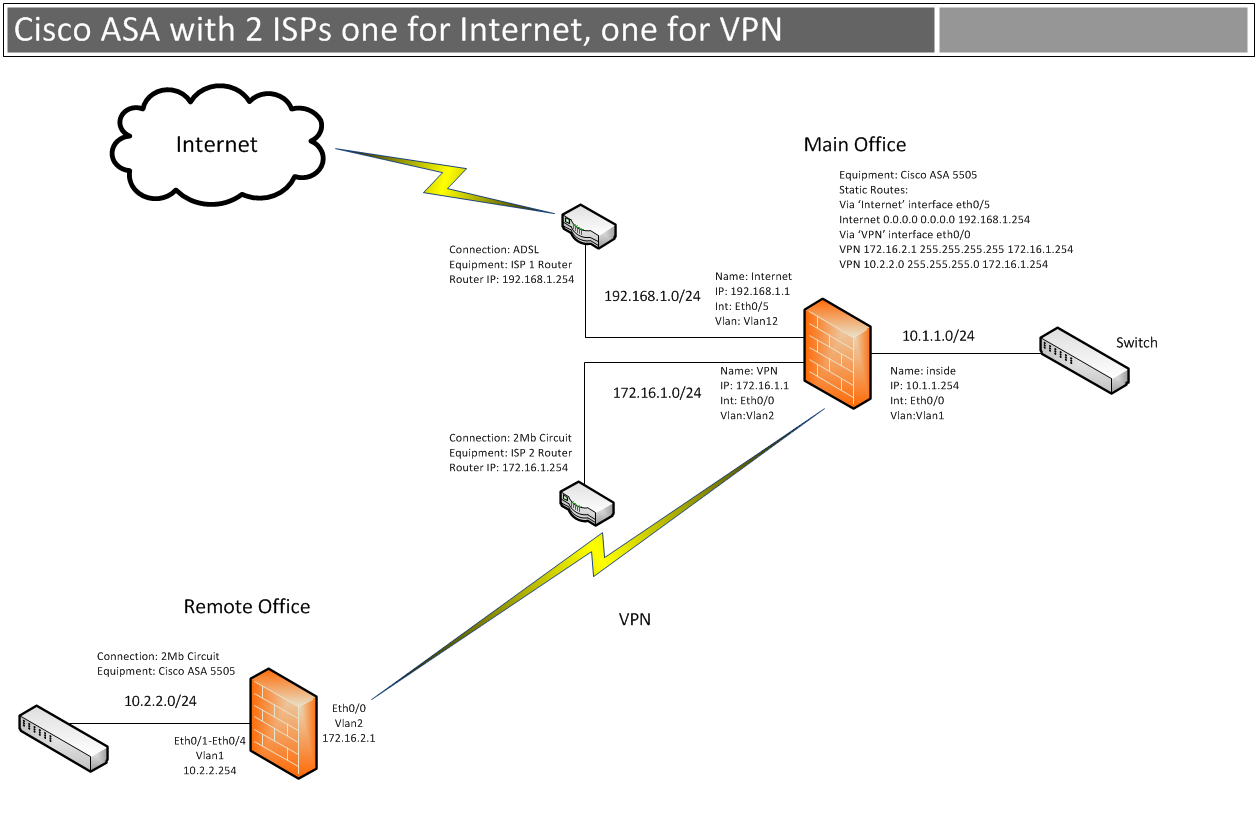
VLANs and interfaces
interface Ethernet0/0
 switchport access vlan 2
interface Ethernet0/5
 switchport access vlan 12

interface Vlan1
 nameif inside
 security-level 100
 ip address 10.1.1.254 255.255.255.0

interface Vlan2
 nameif VPN
 security-level 0
 ip address 172.16.1.1 255.255.255.0

interface Vlan12
 no forward interface Vlan1
 nameif Internet
 security-level 50
 ip address 192.168.1.1 255.255.255.0
no forward interface Vlan1 was needed because of the base licence on the 5505; with a Security Plus licence you may not need it.
Static routes
! Default route: all traffic leaves via ISP 1 (ADSL) unless matched below
route Internet 0.0.0.0 0.0.0.0 192.168.1.254 1

! Remote office subnet (the VPN's interesting traffic) via ISP 2
route VPN 10.2.2.0 255.255.255.0 172.16.1.254 1

! The remote VPN peer itself via ISP 2
route VPN 172.16.2.1 255.255.255.255 172.16.1.254 1
The more specific routes win, so VPN traffic and the tunnel itself use ISP 2, and everything else uses ISP 1. Setting up the site-to-site VPN itself is outside the scope of this post.