~/apply a group policy to a specific operating system
Use a WMI filter so a GPO only applies to certain versions of Windows, with up-to-date queries for Windows 10, Windows 11 and Windows Server 2016 to 2025.
Updated November 2026. I originally wrote this during a Windows 7 rollout, to apply settings to new Windows 7 machines without touching the Windows XP clients. The method is the same today; the queries below are updated for current versions.
Create the WMI filter
-
Open the Group Policy Management Console (
gpmc.msc) and go to WMI Filters under your domain.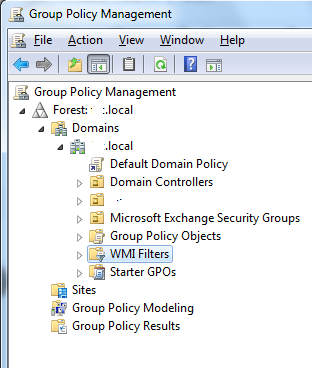
-
Right-click WMI Filters → New. Give the filter a name, click Add, and enter the query (namespace
root\CIMv2).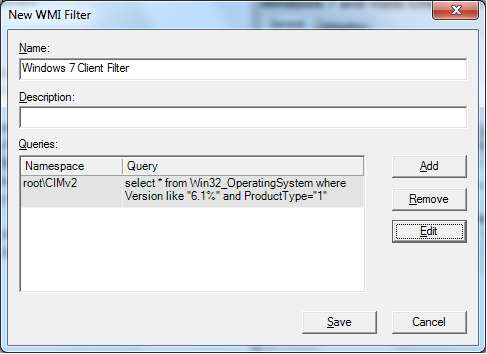
-
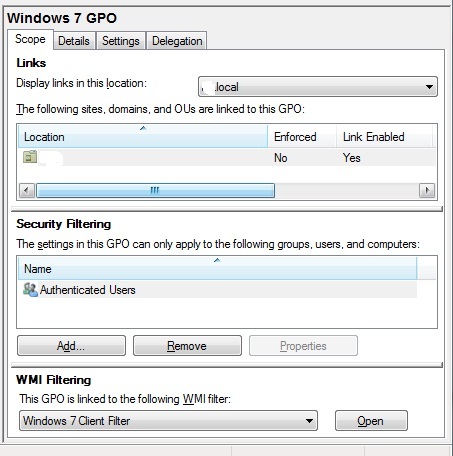
Select the GPO, and on its Scope tab choose the filter under WMI Filtering.
Queries for current versions
Windows 10, Windows 11 and every Windows Server since 2016 report version 10.0, so the build number or the product name tells them apart.
| Target | Query |
|---|---|
| Windows 11 (clients) | select * from Win32_OperatingSystem where Version like "10.%" and ProductType = "1" and BuildNumber >= 22000 |
| Windows 10 (clients) | select * from Win32_OperatingSystem where Version like "10.%" and ProductType = "1" and BuildNumber < 22000 |
| Any client | select * from Win32_OperatingSystem where ProductType = "1" |
| Windows Server 2022 | select * from Win32_OperatingSystem where Caption like "%Server 2022%" |
| Windows Server 2025 | select * from Win32_OperatingSystem where Caption like "%Server 2025%" |
| Member servers only | select * from Win32_OperatingSystem where ProductType = "3" |
| Domain controllers only | select * from Win32_OperatingSystem where ProductType = "2" |
ProductType tells you the role: 1 is a client, 2 a domain controller, 3 a member server.
Tips
- Test the query first on a target machine:
If it returns a result, the filter will match that machine.Get-CimInstance -Query 'select * from Win32_OperatingSystem where ProductType = "1" and BuildNumber >= 22000' - Use WMI filters sparingly. Each one is evaluated at every policy refresh, so lots of complex filters slow down logons. Separate OUs for servers and clients are often the cleaner option.
- WMI filters aren’t included in GPO backups. Export or document them separately.
- Intune-managed devices don’t use WMI filters; use Intune’s assignment filters (for example on
osVersion) instead.